Sales you do not have to write down
Because every game is started and stopped in QUE TRACK, the sales record builds itself. There is no end-of-day adding up from a register.
- Today's sales on the dashboard
- Recent sessions: the latest games with time, duration and amount
- Top tables by earnings, so you can see which tables make the most money
Game history
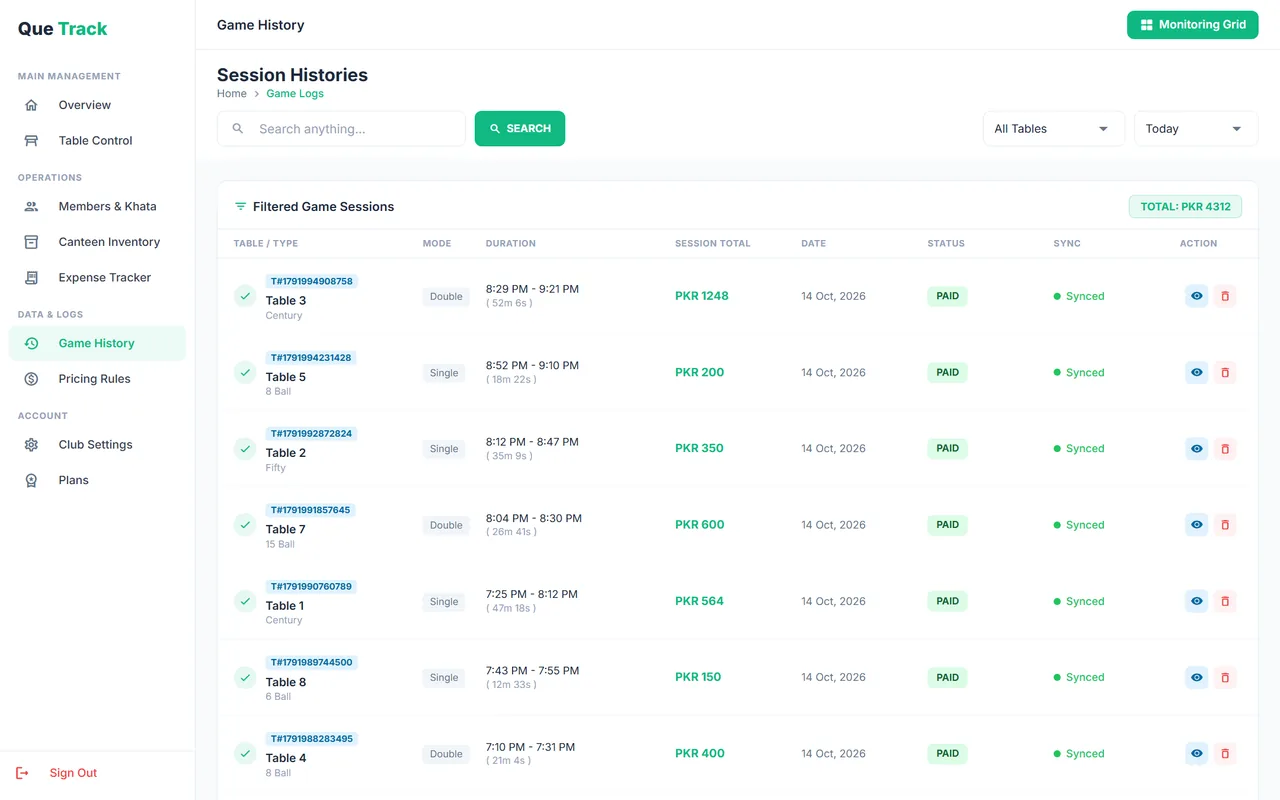
Game History lists every session with its table, game type, player mode, duration, amount and whether it is paid or unpaid. Filter by table and by period (today, this week, this month, all time) and search to find a session. The filtered total is shown in PKR, and you can open any ticket to see its canteen items.
Expense tracker
Record each expense with a name, amount and date: electricity, rent, cloth replacement, staff pay, canteen restocking. Seeing expenses next to sales gives you a clear picture of where the money goes.
Want a simple daily routine for cash and expenses? Read managing club expenses and daily cash.
Expenses & reports: common questions
The dashboard shows today's sales, recent sessions and your top tables by earnings. Game History lists every session with game type, mode, duration, amount and paid or unpaid status, filtered by table and by today, this week, this month or all time, with a total in PKR.
Add an expense with a name, amount and date in the Expense Tracker. It works offline on Windows and syncs with the rest of your data.
Not at the moment. Reports are viewed inside the app.
Yes. The Android app shows the same account, so once the counter PC has synced you can see sales and game history on your phone.